Annapurna Bhandar Verification 2026: West Bengal’s newly formed BJP government has officially launched the Annapurna Bhandar scheme in fulfillment of its key election promise. Under this scheme, eligible women across the state will receive a monthly financial assistance of Rs 3,000 directly into their bank accounts through the Direct Benefit Transfer system. The first payment is scheduled to begin from 1st June 2026.
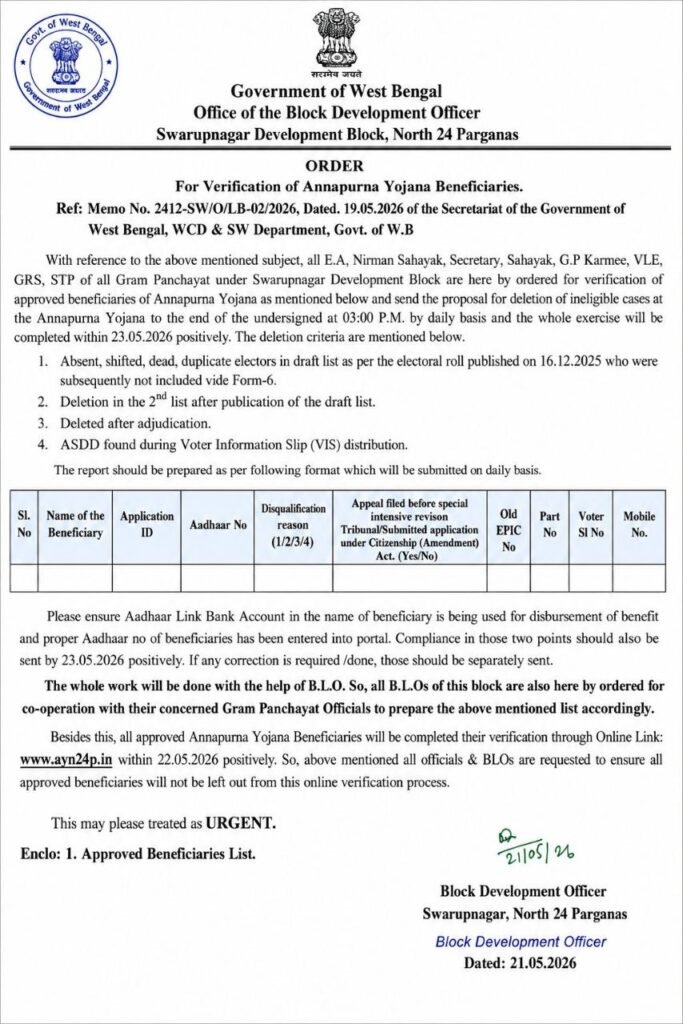
But before any payment is credited, every beneficiary must complete one important mandatory step — the Annapurna Bhandar Verification. This online verification process has already begun across the state, and women who skip or fail to complete it will not receive any payment, regardless of whether they were previously enrolled under the Lakshmir Bhandar scheme.
This article explains the entire verification process in simple English, covering who must verify, what documents are needed, how to complete the process step by step, and where to find the district-wise verification links.
কি কি কাগজ লাগবে — Documents Required for Annapurna Bhandar Verification
The verification process requires only two documents. Make sure both are ready before you begin.
The first document you need is a clear photograph or scanned image of your Aadhaar Card. The photo must be sharp enough for the Aadhaar number and personal details to be clearly readable. Blurry or dark images may cause your submission to fail.
The second document required is a clear photograph or scanned image of your Voter ID Card. Again, ensure that your name, voter ID number, and other details are fully visible in the image before uploading.
Keep both document photos saved on your phone or computer before opening the verification portal, so that uploading them during the process is quick and smooth.
কিভাবে ভেরিফিকেশন করবেন — Step-by-Step Annapurna Bhandar Verification Process 2026
Follow each of the steps below carefully to complete your online verification without any errors.
Step 1 — Open the Verification Link for Your District
The verification portal is different for each district in West Bengal. Scroll down to the district-wise links section at the bottom of this article, find your district, and click on the link provided next to it. This will open the official verification portal for your area.
Step 2 — Select Your Block, Municipality, Gram Panchayat, or Ward
Once the portal opens, you will see dropdown menus asking for your local area details. Select your Block name if you live in a rural area, or select your Municipality name if you live in an urban area. After that, select your Gram Panchayat name or Ward number from the next dropdown.
Step 3 — Enter the Last Four Digits of Your Bank Account Number and Search
In the search field provided, type the last four digits of your bank account number — the account in which you want to receive your Annapurna Bhandar payment. After entering the digits, click the Search button.
Step 4 — Check Your Personal Details on the Screen
After clicking Search, your beneficiary details will appear on the screen automatically. These details will include your ID number, full name, registered mobile number, father’s name, Gram Panchayat name, and village or locality name. Cross-check every detail carefully. If all the information displayed is correct, proceed to the next step.
Step 5 — Enter Aadhaar Card Details and Upload Photo
Type your 12-digit Aadhaar Card number in the designated field. Then click on the upload button and upload a clear photo of your Aadhaar Card from your phone gallery or computer. Double-check that the Aadhaar number you typed matches the one printed on your physical card.
Step 6 — Enter Voter ID Details and Upload Photo
In the next field, enter your Voter ID Card number accurately. Then upload a clear photograph of your Voter ID Card using the upload button. Make sure the card details are fully visible in the image.
Step 7 — Confirm Whether Aadhaar Is Linked to Your Bank Account
The portal will ask you whether your Aadhaar card is currently linked to the bank account in which you want to receive the Annapurna Bhandar payment. Select Yes if it is linked, or select No if it is not yet linked. If your Aadhaar is not linked to your bank account, it is strongly advised that you visit your bank branch and complete the Aadhaar seeding process first, as unlinked accounts may face delays in receiving DBT payments.
Step 8 — Answer the SIR Tribunal and CAA Question
The verification form will also ask whether you have filed an application with the SIR Tribunal or applied under the Citizenship Amendment Act (CAA). Select Yes or No based on your actual situation. Answer this question honestly and accurately.
Step 9 — Submit Your Verification
After completing all the fields and uploading both documents, click on the Submit Verification button. Your Annapurna Bhandar Verification 2026 will be submitted successfully. A confirmation message will appear on the screen — take a screenshot of it and save it for your future reference.
জেলা অনুযায়ী ভেরিফিকেশন লিংক — District-Wise Annapurna Bhandar Verification Links 2026
Special Notice: The government is releasing the district-wise verification links in a phased manner. Not all district links have been activated at the same time. The links that are currently live are listed below. As soon as remaining district links become active, they will be updated here. If a link is slow to open due to high server traffic, wait a few minutes and try again — do not submit your form multiple times.
Annapurna Yojana Verification
Initiative by North 24 PGS District Administration
- Kolkata — Verification Link Active (Visit Official Portal)
- North 24 Parganas — Verification Link Active (Visit Official Portal)
- South 24 Parganas — Verification Link Active (Visit Official Portal)
- Hooghly — Verification Link Active (Visit Official Portal)
- Howrah — Verification Link Active (Visit Official Portal)
- Murshidabad — Verification Link Active (Visit Official Portal)
- Nadia — Verification Link Active (Visit Official Portal)
- Purba Burdwan — Verification Link Active (Visit Official Portal)
- Paschim Burdwan — Verification Link Active (Visit Official Portal)
- Purba Medinipur — Verification Link Active (Visit Official Portal)
- Paschim Medinipur — Verification Link Active (Visit Official Portal)
- Bankura — Verification Link Active (Visit Official Portal)
- Birbhum — Coming Soon
- Malda — Coming Soon
- Uttar Dinajpur — Coming Soon
- Dakshin Dinajpur — Coming Soon
- Jalpaiguri — Coming Soon
- Darjeeling — Coming Soon
- Cooch Behar — Coming Soon
- Alipurduar — Coming Soon
- Kalimpong — Coming Soon
- Jhargram — Coming Soon
- Purulia — Coming Soon
Remaining district links will be added here as they are officially activated. Bookmark this page and check back regularly for the latest updates.
গুরুত্বপূর্ণ বিষয় — Important Things to Remember Before and After Verification
Make sure your name, date of birth, and all personal details are identical across your Aadhaar Card, Voter ID Card, and bank account records. Even a small mismatch in spelling or date can cause your verification to be rejected.
Use a stable internet connection when uploading document photos. A slow or interrupted connection during upload can lead to incomplete submissions.
Do not refresh or close the browser page while the form is being submitted. Wait for the confirmation screen to appear before closing the portal.
If your Aadhaar card is not yet linked to your bank account, visit your nearest bank branch at the earliest and request Aadhaar seeding. Without Aadhaar-bank linkage, the DBT payment cannot be processed into your account.
Keep the confirmation screenshot or acknowledgement number received after verification safely. This will be needed if any issue arises during payment processing or during counselling and grievance resolution.
If your payment does not arrive even after successful verification, contact your nearest Block Development Officer (BDO) office or local municipality office for assistance.
গুরুত্বপূর্ণ প্রশ্ন ও উত্তর — Frequently Asked Questions (FAQs)
Q1. When will the Annapurna Bhandar scheme payment start in West Bengal?
The Annapurna Bhandar scheme monthly payment of Rs 3,000 is scheduled to begin from 1st June 2026 for all verified and eligible beneficiaries in West Bengal.
Q2. Do Lakshmir Bhandar beneficiaries need to verify again for Annapurna Bhandar?
Yes, every woman who was previously receiving benefits under the Lakshmir Bhandar scheme must complete a fresh online verification for the Annapurna Bhandar scheme separately. Previous enrollment does not automatically transfer.
Q3. What documents are needed for Annapurna Bhandar Verification 2026?
Only two documents are required — a clear photo of your Aadhaar Card and a clear photo of your Voter ID Card. Both must be uploaded during the online verification process.
Q4. What if my district verification link is not yet activated?
The government is rolling out district-wise links gradually. If your district link is not yet live, check back on this page after a day or two. Links are being updated as they are officially released.
Q5. Can I verify from my mobile phone?
Yes, the verification process can be completed from any smartphone with a working internet connection. Open the district verification link in your phone’s browser, fill in the required details, and upload the document photos from your phone gallery.
Q6. What happens if I submit the verification form more than once?
Avoid submitting the verification form multiple times. If the portal is slow, wait patiently and try again — do not click Submit repeatedly. Multiple submissions may cause errors in your application.
Q7. Is Aadhaar-bank account linkage mandatory for receiving the payment?
Yes, your Aadhaar card must be linked to the bank account in which you wish to receive the Annapurna Bhandar payment. Without this linkage, the DBT system cannot credit the amount into your account. Visit your bank branch to complete Aadhaar seeding if it is not already done.